


KaraFun: Karaoke, Battle, Quiz
4.61.32K Reviews
App Specs
- Version
- Varies with Device
- Updated On
- License
- Free
- Downloads
- 1,000,000+
- Developer
- Recisio
- Categories
- Music & Audio
- Platform
- Android, iOS
Screenshots
 Analysis by AppCompare
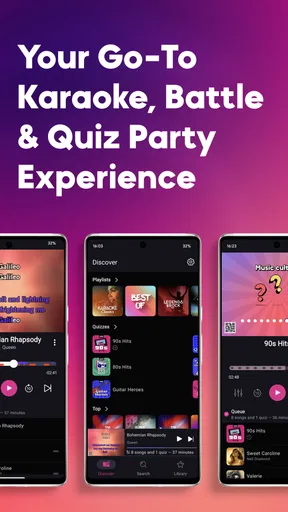
When I plan a karaoke night, the hardest part is rarely choosing who sings first; it is getting from “we should do this” to a setup everyone can use without a long pause to search for songs. KaraFun is a music and audio app from Recisio that brings karaoke and a music quiz together, so it can carry a casual evening from song picking into a group activity. I see it as a better fit for people who want a ready-to-run singalong than for listeners looking only to stream songs in the background.
Start with the room, not the song list
Before opening a karaoke app, I think about who is coming, where people will sing, and whether the room has a screen that everyone can see. Those small decisions shape the session more than a huge queue does. A living-room gathering with a TV calls for a different setup from a solo practice session with a phone, and a group of mixed confidence levels needs a gentle first song rather than a demanding vocal showcase.
This is where KaraFun’s combination of karaoke and quiz play makes sense. The app is free to install, but it also offers in-app purchases priced from $6.99 to $59.99 per item, so I would check the available options before building an evening around access to a particular selection. Its Teen content rating is another useful detail for anyone planning a family gathering: it is worth considering who will be using the app and what they expect from the session.
Build a queue that keeps the night moving
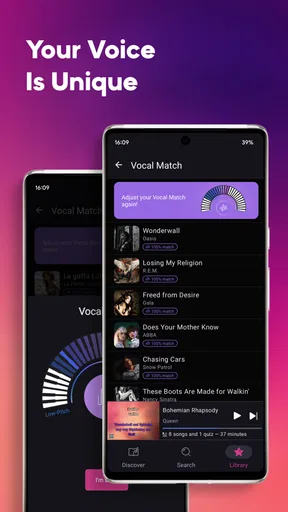
Once the group is together, I would start by making a short playlist rather than trying to settle every song choice one at a time. KaraFun lets you create playlists, which is practical when several people have different tastes. I would mix familiar crowd-pleasers with a few personal picks, then leave room for requests. That approach reduces dead air and gives quieter guests time to decide whether they want a turn.
A useful trick is to treat the playlist as a running order, not a fixed commitment. Put a confident singer early to break the ice, place a group-friendly choice after a solo, and keep a few alternatives ready in case a song feels wrong for the room. The app makes browsing and organizing part of the preparation, but the host still has to judge the energy and keep the queue from turning into a long list that nobody wants to wait through.
Move from phone to shared screen
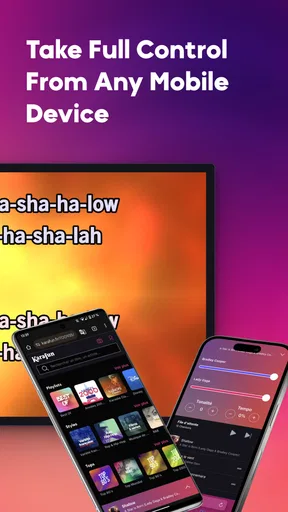
For a group, the dual-screen display is one of the more practical parts of the experience. Connecting a device to a TV can put the lyrics where singers and spectators can follow them together, rather than making everyone crowd around one handset. I would test that arrangement before guests arrive: choose the display connection, check that the lyrics are readable from the seating area, and make sure the person managing the queue can still reach the controls.
That handoff matters. The host may be choosing songs, while the singer needs to see the words and the rest of the room needs to know when it is their turn. A shared display helps with the lyric side, but it does not automatically solve turn-taking or sound setup. I would agree on a simple order and keep the phone with one person who can handle requests; otherwise, the device can keep changing hands just as a song is about to start.
Worth Reading Before You Choose

EA SPORTS FC Mobile 26 Is a Bigger Football Game, but It Takes Time

Flipboard Shows What News Apps Must Do Beyond the Feed

Switching to Android Auto Means Rethinking Your Driving Routine

Google Calendar Makes a Crowded Week Easier to Manage

Ludo King Makes the Most of the Minutes Between Plans

Baby Panda World Brings Quick Play to Modern Phones, but Its Game Library Feels Busy
Keep a backup plan for the connection
Offline synchronization can help when the network is unreliable, but it is best treated as preparation rather than an emergency fix. I would download the tracks I expect to use while I still have a dependable connection, then avoid assuming that every last-minute request will be available offline. This is especially useful for a gathering in a place with patchy Wi-Fi, or for practicing away from home without wanting the session to depend on a live connection.
There is a trade-off: planning offline means choosing some songs in advance, while leaving everything until the party means relying more heavily on the connection and on browsing in the moment. I would make a modest core playlist for the likely crowd and keep a few open slots for spontaneous choices. That way, a request can add to the evening without making the entire session hinge on finding one specific track.
From first song to a shared game
If you’re anything like me, you probably love a good karaoke session. Whether it's belting out your favorite tunes at home or showing off your vocal prowess at a party, karaoke is a fantastic way to have fun and let loose. That's where KaraFun comes into play. This app is a game-changer for karaoke enthusiasts, providing an extensive library of tracks and a fun twist on traditional karaoke with its music quiz feature. Let me take you through my experience with KaraFun and why it might just become your new favorite app.
Unleashing Your Inner Superstar
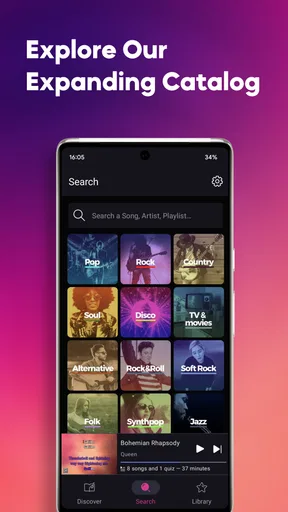
The first thing that strikes you about KaraFun is its massive song library. Seriously, it's like having the world of music at your fingertips. From classics to the latest hits, KaraFun has it all. I dove right in and was thrilled to find everything from Frank Sinatra to Taylor Swift. The app updates regularly, so you'll always have access to fresh tracks.
One aspect I particularly loved is the ability to create playlists. You can tailor your karaoke experience to match your mood or the vibe of your gathering. Whether you want a night of 80s rock or a pop diva showdown, creating a playlist is a breeze. The user interface is intuitive and easy to navigate, which means you spend less time finding songs and more time singing your heart out.
Setting the Stage
Now, let's talk about the features that make KaraFun stand out from the crowd. The app offers offline synchronization, which is a lifesaver for those moments when your Wi-Fi decides to take a break. You can download your favorite tracks and enjoy uninterrupted karaoke, no matter where you are.
Another cool feature is the dual screen display. If you're hosting a karaoke night, you can connect your device to a TV and let everyone follow along with the lyrics. It's an excellent way to create a professional karaoke setup without the need for bulky equipment.
And for those who are a little shy about singing in front of others, the app offers a solo mode. You can practice in private before showcasing your skills to friends. It's a great confidence booster!
Game On: The Music Quiz
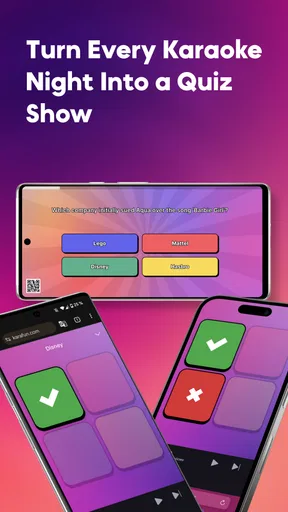
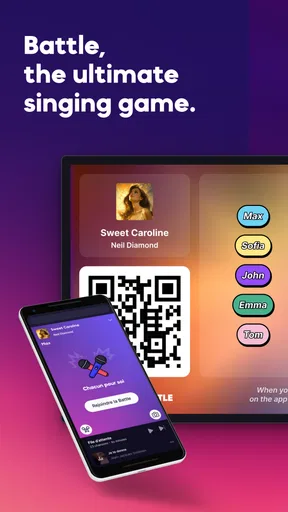
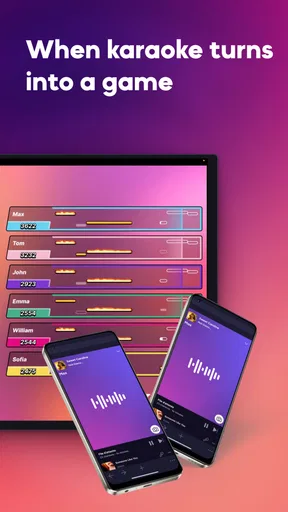
In addition to the traditional karaoke experience, KaraFun introduces a fun and interactive music quiz. This feature turns your karaoke session into a game where you can challenge your friends and family. The quiz tests your knowledge of lyrics, song titles, and artists, making it perfect for music lovers.
I had a blast testing my music IQ against my friends. The app provides different levels of difficulty, so whether you're a casual listener or a music aficionado, there's a quiz for you. It's a fantastic way to add a competitive edge to your karaoke night.
How the quiz fits into the evening
I would use the quiz as a change of pace, not as a second activity running over the singing. After a few turns, people who do not want to perform can still join in by guessing, and the group gets a natural pause to pick the next songs. That makes the quiz especially useful when guests have different comfort levels: someone can participate without taking the microphone, then decide later whether to sing.
For a smoother handoff, I would announce the switch before starting a quiz round and make sure everyone can hear the prompts or discussion. A quiz can feel lively with people calling out answers, but it can also become confusing if the host is trying to manage the playlist at the same time. Keeping one person in charge of the device and letting others answer is a simple way to avoid a scramble between rounds.
Where it differs from a music streamer
A standard music streaming app is usually the easier choice when the goal is to listen to full recordings, discover artists, or keep music playing while people talk. KaraFun is aimed at a more active moment: following lyrics, taking turns, and turning music knowledge into a group game. That focus is its strength, but it also means I would not choose it as a replacement for a general-purpose listening library.
Compared with a dedicated karaoke setup, the appeal is convenience. Using a phone or other device with a TV can make a home session less dependent on specialized equipment. The trade-off is that the host needs to prepare the display and queue, and the room still needs a workable way for everyone to hear the music. If your priority is a permanent, highly tailored stage setup, dedicated equipment may suit you better; if you want a flexible activity for an occasional gathering, an app is easier to bring into the plan.
Small choices that prevent awkward pauses
For an ordinary weekend scenario, I would use the app before friends arrive to make a short playlist around the group’s tastes, test the TV connection, and download likely picks if the network might be unstable. When people arrive, I would start with a well-known group song, then offer solo turns only after the room has warmed up. If energy dips, I would switch to the quiz rather than forcing another performance. That sequence gives guests several ways to take part without making anyone feel put on the spot.
There are a couple of practical trade-offs to keep in mind. A large library is useful only if you can narrow it down quickly, so I would search by a few likely artists or styles before the event rather than browse indefinitely with a room watching. And while offline preparation adds reliability, it cannot anticipate every spontaneous request. I would treat the downloaded queue as a safety net, not a promise that every song someone names will be ready.
Who will enjoy it, and who may prefer something else
I would recommend KaraFun to people who host casual karaoke nights, enjoy singing privately, or want a music activity that does not depend on everyone taking a turn. The quiz gives music fans another way to join in, and playlist creation helps a host shape the mood instead of starting from scratch each time. It is also a reasonable choice for someone who wants to try karaoke without first investing in a dedicated setup.
I would steer away from it if you mainly want uninterrupted music playback, dislike organizing a queue, or need a fully hands-off party system. It may also frustrate a group that expects every requested song to be instantly ready, especially if the host has not planned for connectivity or checked purchase options. The app works best when someone is willing to guide the flow; it is not a substitute for a host who can read the room.
Cost, access, and the decision to keep using it
KaraFun is free to download, and its average rating is 4.6 from around 17,000 ratings, with more than 1 million installs. Those figures suggest it has found a substantial audience, but they do not tell me whether its song selection fits your taste or whether you will use it often. The in-app purchase range, from $6.99 to $59.99 per item, makes it sensible to look at the available access choices before you commit to a specific event or routine.
It first appeared on November 14, 2011, and it supports devices running Android 8.0 or later. For me, the practical question is less about its age and more about whether it suits the way I plan to sing: solo practice, a prepared living-room night, or a spontaneous group session all ask for different levels of preparation. If you are unsure, I would start by trying the free app, exploring the choices that matter to you, and only then deciding whether an in-app purchase is worth it.
Wrapping It Up
Overall, KaraFun is a must-have app for anyone who loves karaoke and music. Its vast library, user-friendly interface, and innovative features make it a standout choice. Whether you're throwing a party or just want to unwind with some tunes, this app has got you covered.
If you're looking to spice up your karaoke nights with a bit of friendly competition, or simply enjoy a seamless karaoke experience, give KaraFun a try. Trust me, you won't be disappointed. Happy singing!
Pros
- Extensive song library available.
- User-friendly interface design.
- Customizable playlists feature.
- Offline mode for singing anywhere.
- Regular updates with new songs.
Cons
- Limited free song access.
- Requires internet for full features.
- Ads in the free version.
- Subscription can be pricey.
- Some songs lack instrumental quality.
FAQs for KaraFun: Karaoke, Battle, Quiz
What features does KaraFun offer for karaoke enthusiasts?
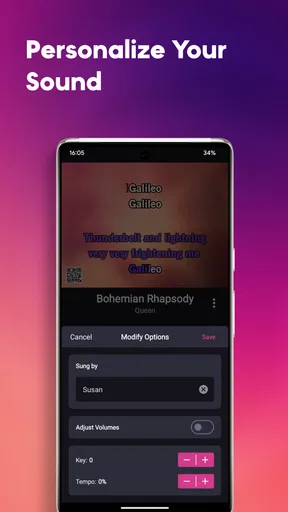
KaraFun provides a vast library of over 45,000 songs across various genres, ensuring there's something for everyone. It also offers offline mode, allowing users to download their favorite tracks for later use. Additional features include customizable key and tempo adjustments, duet mode, and the ability to create custom playlists for a personalized karaoke experience.
Is KaraFun suitable for group events or parties?
Absolutely! KaraFun is designed to enhance group events with its user-friendly interface and a comprehensive library of songs. The app supports multiple devices, allowing you to connect to a TV or speakers for a more immersive experience. With its duet mode and ability to host multiple microphones, it’s perfect for parties or gatherings.
Does KaraFun require an internet connection to work?
While an internet connection is required to initially access the library and download songs, KaraFun offers an offline mode. This feature allows users to download songs for offline playback, which is perfect for areas with limited internet access or when planning to use the app on the go without reliable connectivity.
Are there any subscription fees associated with KaraFun?
KaraFun offers a free version with limited features, but for full access to the extensive song library and premium features, a subscription is required. The app offers various subscription plans, including a monthly and annual option, ensuring flexibility and affordability for different user needs.
Is KaraFun available on both Android and iOS devices?
Yes, KaraFun is available for download on both Android and iOS platforms. This cross-platform availability ensures that users can enjoy their favorite karaoke tunes on a wide range of devices, including smartphones and tablets, making it convenient and versatile for all users.


